What do my result squares mean?
Read a shared result from left to right. Each square stands for one question, in the order you played it. Green is 30 points and blue is 60. Yellow and purple each cover two possible scores. A white square means that prompt ended at zero.
What can you tell at a glance?
In that row, question three is the only one that earned nothing. The player could have chosen Skip question or run out of time. Both get a white square. On question four they came back with a Rare answer, worth 60, and on question five they found something worth even more. Pick out that purple square and you’ve found the highest-scoring catch of this particular dive.
| Square | Possible points |
|---|---|
| White | 0 |
| Yellow | 10 or 15 |
| Green | 30 |
| Blue | 60 |
| Purple | 85 or 100 |
There are six scoring tiers for accepted answers, but only four colours for catches in the shared row. Both Plankton and Too Clever get yellow. At the other end, a Deep Cut and a One in a Krillion both get purple. If a friend sends seven coloured squares with no white, they scored on all seven prompts. You need the number beside the row to know how deep that took them.
Where the 230 points came from
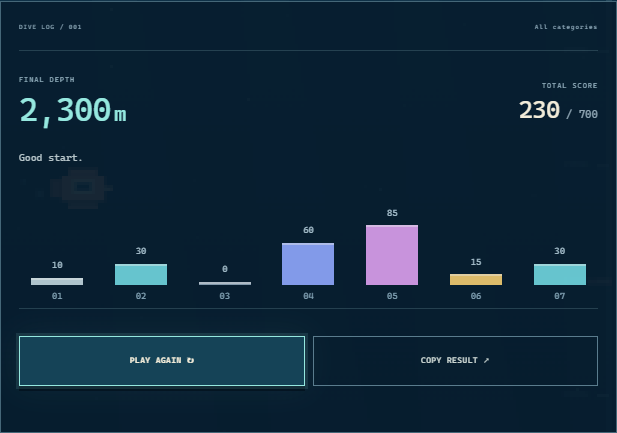
The two greens contributed 60 points between them. Add the blue and you’re at 120. The 85-point purple takes that to 205. That leaves 25 points for the two yellows. One was worth 10 and the other 15. From the chat message alone you couldn’t tell which yellow was which. The bars on the player’s screen settle it. Question one earned 10 and question six earned 15.
Look at the first bar in the screenshot. It’s pale and easy to mistake for a miss if you’re hunting for the exact colours from the message. The 10 above it tells you why it becomes yellow when copied. Only the third bar has a zero. To see what happened there, look at the third row under Your results on the game page. Your own review distinguishes a pass from a timeout. Someone reading the pasted row sees the same white square for either.
This also explains how two players can paste identical rows and have different totals. Give the fifth answer in that example 100 points instead of 85, leaving everything else as it was. The row looks exactly the same, but the score becomes 245 and the depth rises to 2,450 metres. Even matching totals and colours don’t establish that you played the same questions. If comparing guesses is the part you enjoy, here’s how to share a set of prompts with a friend.
What your friend receives
On the results screen, choose Copy result before starting another dive. Paste it into a message and you’ll see the score, depth, squares, category and game link. A mixed round says “All categories.” The message leaves out the question text and what you typed. You can ask a friend how their dive went without spoiling your best find for them.
If a copy panel opens, the browser needs you to copy the selected text yourself. Either way, you choose where to paste it. Keep the total alongside the squares when you send it. That one line is what lets a friend see the difference between two otherwise identical rows.