Can I play with just a keyboard?
Yes. On a laptop or desktop, use Tab to choose a category and Enter to start. After that the game moves the cursor into the answer box for each question and onto the continue button after each reveal. For a dive where every guess is accepted, you can leave your hands on the typing keys all the way to the scorecard.
Get from the home page to the first answer
On the game home page, press Tab until you see the focus outline around a category you fancy. To draw from all six subjects, carry on to Play mixed. Tabbing across the category buttons gives you time to choose. Pressing Enter on one starts the round straight away.
Let go of the key and read the smaller line under the question while the preview counts down. Keystrokes during those three seconds don’t fill in a guess. When Your answer and the 25-second timer appear, the box is ready. Type your guess and press Enter once. There’s no need to tab over to Submit first.
One exception is an open dialog. If you opened How to play or Settings during the countdown, the game leaves your keyboard focus there. Press Escape to close it, then tab to the answer box if you can’t see a cursor in it. The answer clock keeps going while the dialog is open. To change sound or motion at leisure, make that adjustment on the home page before choosing your category.
If the text stays in the box
An accepted guess brings up your catch and its points. If the question is still there, look just beneath the input. The message “Unlisted answer. Try another.” means the game received your guess and the clock is still running. It has also selected what you just typed. Your very next letter can be the first letter of a completely different answer.
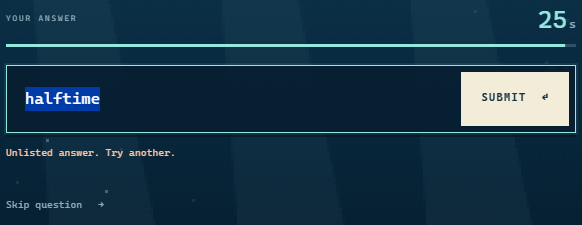
Suppose you’ve used an abbreviation and now want to try the full name. Type the full version over the selection and submit again. If you only want to repair the last letter, use the right arrow to put the cursor at the end before you backspace. Hitting Backspace while the whole word is highlighted clears it. If the spelling looks fine, the guide to unlisted answers can help you decide whether the wording of the prompt is the real snag.
Skip a question on purpose
From an empty answer box, press Tab to reach Skip question. The empty Submit button is disabled, so focus passes over it. With a guess still in the box, Submit is available. Tab past it to Skip question, check which control has the outline, then press Enter. If you’ve gone one control too far, hold Shift and press Tab to go back one.
A skip brings up its own reveal and keeps the points you’ve already earned. You can use it to get past one blank in the middle of an otherwise good dive.
Wait for the button before pressing Enter again
After an answer or a skip, give the reveal a moment. When Next question appears, it takes focus. Now is a good time to take a drink or look at your depth. The next preview starts with your next press of Enter. If you’re interrupted earlier, here’s where the timer will wait.
After question seven the same button reads View results. Press Enter to open the scorecard. If you want a copy, tab to Copy result before starting another round. Look for Result copied. If a manual-copy panel opens instead, the text is selected for you to copy with your usual keyboard shortcut.